
At some point, every serious golfer in Dallas does the math.
Green fees. Range time. Memberships. The drive across town on a Tuesday evening when you have maybe ninety minutes to work on your swing. The summer months when it is simply too hot to practice effectively outdoors. The weeks in January when the weather decides it is not cooperating.
Add up range sessions, memberships, simulator rentals, and practice time over a few Dallas summers and most golfers eventually realize the same thing: they are spending a meaningful amount of money every year for practice access that is still weather-dependent and inconvenient.
Which is why professional golf simulator installation in Dallas has shifted from luxury conversation to serious home upgrade. Not “wouldn't that be cool” but “why haven't I done this yet?”
The short answer is that most people do not know how a professional simulator build actually works, what it costs, or what separates a setup that performs like a real practice environment from one that collects dust in the corner of a garage.
This article covers all of it.
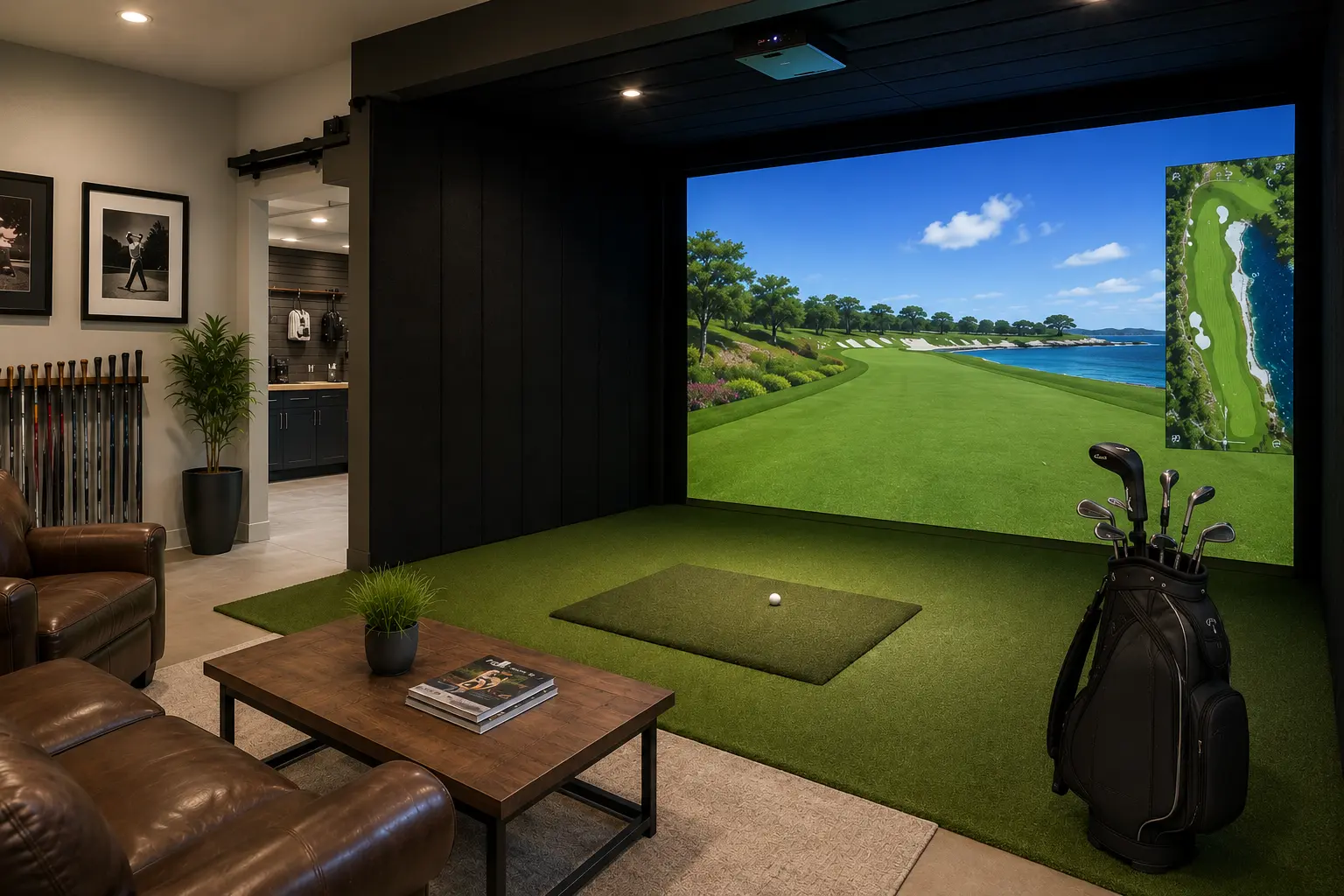
Why Dallas Golfers Are Building Simulators at Home
North Texas has a complicated relationship with golf. The courses are excellent. The golfing culture is serious. And the weather makes consistent outdoor practice genuinely difficult for a significant part of the year.
June through August in Dallas is not exactly prime swing-improvement season. Triple-digit heat, limited early morning tee times, and the physical reality of practicing in that environment make it difficult to put in meaningful repetitions consistently.
Then add unpredictable winter weather, work schedules, evening traffic, and the general friction of getting to a range or course regularly, and the average golfer across Dallas, Plano, Frisco, Southlake, Prosper, and the Park Cities is practicing far less than they actually want.
A professional golf simulator solves all of that at once.
You practice when you want, for as long as you want, in a climate-controlled environment that gives you significantly better feedback than most public range sessions ever could. For golfers serious about improving, that kind of access changes everything.
Beyond practice, the entertainment value is real too. Simulator systems running platforms like E6 Connect, GSPro, and TGC 2019 put you on world-class courses with realistic ball flight, accurate shot data, and multiplayer functionality that turns a Friday night with friends into something considerably more memorable than another restaurant reservation.
What a Professional Golf Simulator Installation Actually Includes
This is where most online research becomes vague.
People see a projector and a net and assume that is more or less what a simulator is. A professionally installed golf simulator system is considerably more involved than that, and the difference matters significantly when you are swinging a driver at full speed inside your home.
Space Evaluation and Custom Design
Every professional golf simulator installation in Dallas starts with a real evaluation of the space.
Ceiling height is the first major consideration, with nine to ten feet being the practical minimum for most golfers swinging freely. Taller players or golfers with steeper swing planes often require additional clearance.
Room dimensions, hitting distance from the screen, projector throw ratio, impact zone spacing, launch monitor placement, lighting conditions, and swing path clearance all factor into the design before a single piece of equipment is ordered.
A garage golf simulator installation is common, but so are bonus rooms, dedicated golf rooms, basements, lofts, and even large offices. They are are all workable with the right design approach.
The space does not need to be perfect.
It needs to be properly evaluated.
Enclosure Construction and Impact Protection
A professionally built simulator enclosure is not simply a net hanging from the ceiling.
It is a fully engineered hitting bay with a commercial-grade impact screen designed to absorb repeated full-swing strikes, side netting for ball containment, wall protection, acoustic management, and structural reinforcement where needed.
This is the part of the installation that protects your home and keeps the simulator safe to use for years.
Cutting corners here is where many DIY builds fail.
A screen not designed for repeated full-speed impact, inadequate side containment, or improper mounting geometry creates safety issues, bounce-back problems, and equipment damage over time.
Professional installation eliminates those risks before the first swing ever happens.
Flooring and Hitting Surface
The turf and hitting surface inside a golf simulator are not cosmetic details.
They directly affect feel, stance stability, joint comfort, and how accurately the launch monitor reads your shot.
Premium commercial-grade turf flooring, properly specified stance mats, and hitting surfaces engineered for realistic contact create a noticeably different experience from lower-end consumer setups.
This is also where Synthetic GreenScapes brings a genuine advantage.
Performance turf installation is the company’s core business, which means simulator flooring is approached with the same technical precision as a professional backyard putting green or commercial sports turf installation, not as an afterthought added at the end of a simulator build.
Launch Monitor Selection and Calibration
The launch monitor is the brain of the system.
It captures ball speed, launch angle, spin rate, carry distance, club path, face angle, and a range of other data points that determine the quality of your practice feedback.
The right launch monitor depends on your goals, your room dimensions, your lighting conditions, and your budget.
Foresight and TrackMan represent the high end of accuracy and data depth, which is why they are widely used by tour professionals and elite instructors. Uneekor systems offer an excellent balance of performance and value for serious home golfers who want reliable analytics without stepping fully into tour-level pricing.
Selecting and calibrating the correct launch monitor for the specific conditions of your room is a technical process that directly affects how accurately the simulator reflects your real swing.
A launch monitor that is slightly out of position or improperly calibrated can produce data that feels believable while still being wrong, which is actually worse than no data at all for someone trying to improve.
Projector Setup and Software Configuration
Projector placement, throw distance, brightness calibration, image alignment, and software setup determine whether your simulator feels immersive or underwhelming.
Professional installation handles mounting geometry, ambient light control, software integration, and visual calibration so the experience matches the quality of the performance data.
Platforms like E6 Connect, GSPro, and TGC 2019 all have different strengths. Some excel at simulation realism. Others are stronger for structured practice or multiplayer functionality.
The right platform depends entirely on how you plan to use the system most.
Final Calibration, Testing, and Walkthrough
A professional simulator installation is not finished when the hardware powers on.
Ball flight accuracy, screen response, projector alignment, launch monitor validation, software tuning, and environmental calibration all happen before the installation is considered complete.
You should walk away knowing exactly how your system works and confident that it is performing accurately from the very first swing.
Where Dallas Homeowners Are Installing Golf Simulators
The most common locations are garages and dedicated golf rooms, but the range of workable spaces is broader than most people assume.
Garages remain popular because they offer the square footage, ceiling height, and separation from living areas that make a simulator practical. A properly designed double-bay garage with climate control, quality lighting, insulated walls, and a professional enclosure becomes a year-round golf studio most golfers would not trade for anything.
Even single-bay garages can accommodate a high-performance golf simulator installation with the correct layout and equipment selection.
Dedicated golf rooms in larger homes across Preston Hollow, Southlake, Prosper, Highland Park, and University Park are increasingly being designed specifically around simulator installations during renovation or new construction projects. When a room is designed for the purpose from the beginning, the results are exceptional.
Bonus rooms, lofts, basements, and large home offices also work surprisingly well with the proper enclosure design and lighting strategy.
The key is always the same:
A proper site evaluation before equipment decisions are made.
What Does a Golf Simulator Installation Cost in Dallas?
This is the question most homeowners have and most websites avoid.
Here is the honest answer.
A complete professional golf simulator installation in Dallas typically ranges from $9,000 to $50,000 or more depending on:
- Room size
- Launch monitor selection
- Enclosure complexity
- Software platform
- Flooring specification
- Finish level
- Custom construction requirements
Entry-level professional builds with quality hardware and proper enclosure construction typically begin in the low to mid-teens.
High-end simulator rooms with premium launch monitors, custom carpentry, acoustic treatment, integrated lighting, luxury finishes, and dedicated room buildouts extend well beyond that.
DIY simulator kits exist at lower price points, but they come with real tradeoffs in durability, safety, enclosure quality, calibration accuracy, and long-term performance.
For golfers serious about using a simulator as a genuine practice tool rather than a novelty, the difference between a professionally installed system and a consumer DIY setup becomes obvious quickly.
The more useful way to think about cost is in terms of what the alternative already costs.
Serious golfers in Dallas who use ranges regularly, maintain memberships, pay for instruction, or rent simulator bays are already spending meaningful money every year for access to practice that is still inconvenient, weather-dependent, and often limited in data quality.
A home simulator installation changes that equation permanently.
As with all projects, it starts with a custom free design consultation to get started.

Get a Free Estimate for Your Project
Tell us a few details and our team will provide a fast, no-obligation quote tailored to your space.
✓ Professional grade turf and installation
✓ Local expertise, fast scheduling
✓ Transparent pricing — no surprises

Premium artificial turf installations from a local company you can trust for durability, performance, and long term value.
Services
Address
12080 Forestgate Drive
Dallas, TX 75043
Service Area Map
Hours of Operation
Monday - Friday 9am - 7pm
Saturday 9am - 4pm
Download
Homeowner's
Turf Guide

Premium artificial turf installations from a local company you can trust for durability, performance, and long term value.
Address
12080 Forestgate Drive
Dallas, TX 75043
Service Area Map
Hours of Operation
Monday - Friday 9am - 7pm
Saturday 9am - 4pm
Download Homeowner's
Turf Guide

Company
972-640-7101